
Chippewa County Active Warrant List
Chippewa County has no photo-based most wanted gallery. What it does have is the LETG Active Warrant Listing, a table the Chippewa County Sheriff links as its official warrant resource. It is not a handpicked lineup of fugitives. It is simply every active warrant in one table, with no photo column, no published count, no posting schedule, no reward program, and no Crime Stoppers tie-in.
Each table carries a Last Run Date. That tells you when the list was generated, not when any warrant was signed. Some entries go back years. Treat a row as a reason to ask a question, not as proof the warrant still stands today.
The listing also is not a jail log. A name here does not mean the person sits in the Chippewa County Jail or has a fresh booking. The Sheriff's Office keeps its custody table separate for a reason. Use the warrant table for the active listing, then go to the Sheriff or the court for an answer that matters. The official active-warrant table is the right place to start any Chippewa County warrant search.
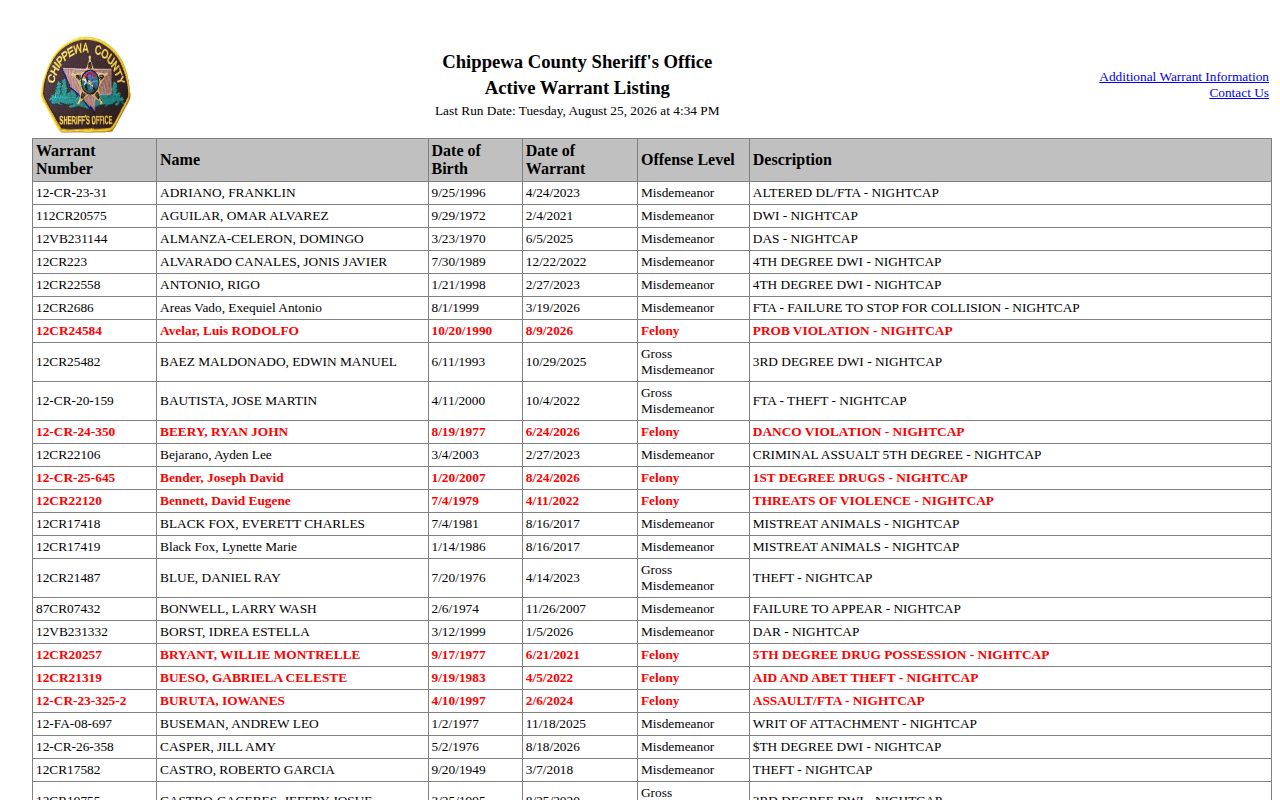
The screen capture shows the official table format only. Open the live source for the current Last Run Date and the full row before relying on anything.
Note: The county publishes an active-warrant table, not a verified most-wanted photo gallery or a stated weekly release schedule.
Chippewa Warrant Listing Fields
Read the whole row, not just the name. Two people can share a name easily. The table gives identifiers and warrant details you can compare before making any inquiry. It does not give a full case history or guarantee that a displayed entry reflects the current status without confirmation.
| Table field | What it identifies |
|---|---|
| Warrant number | The reference number shown for the warrant entry. |
| Name | The name displayed by the Chippewa County table. |
| Date of birth | A matching detail that helps distinguish people with similar names. |
| Warrant date | The date attached to the warrant, distinct from the table's Last Run Date. |
| Bond or bail | The amount or condition information displayed in that row. |
| Offense level | The level listed with the entry. |
| Description | The Chippewa County short description, which is not a full court narrative. |
| Last Run Date | The table-generation date used to assess how fresh the display is. |
When you call the Sheriff's Office or court, keep a few details handy. The warrant number, date of birth, and Last Run Date all help staff find the right matter fast. They also keep a web listing from being treated as the final word.
The offense description and level help tell rows apart. Still, they are no stand-in for the complaint or the register of actions. The table holds no incident narrative and no court calendar. Match several fields to cut the risk of mixing up similar names, then let the responsible office settle what is left.
Use the Chippewa Warrant List
The list is a plain browsable table. There is no special search form. There is no fixed refresh schedule either, so a slow look beats a quick name match. Start with the county source and note the date on the page. Weigh the whole entry before deciding whether to follow up.
- Open the official active-warrant listing from the Sheriff's Office link.
- Record the table's Last Run Date before interpreting the row as current.
- Use the browser's Find feature for a surname, then compare the name with the date of birth and warrant number.
- Read the warrant date, bond or bail entry, offense level, and description without reducing the row to a headline.
- Use the Sheriff's Office or the court to confirm a match and current status before making any decision.
Someone on the warrant list may later land in custody. When that happens, the Chippewa County roster and booking-record path covers the separate current-custody record. A warrant entry does not guarantee a roster appearance. The roster tracks people in Chippewa County custody now, and the warrant table serves a different purpose.
Confirm a Chippewa County Warrant
A good warrant check has two steps. First, scan the active-warrant table for the right entry. Second, confirm with the Sheriff's Office or the court, which can speak to current status and next steps. The Minnesota Court Records Online case search, known as MCRO, can also pull public case information and a register of actions once a case is located.
- Review the official warrant row and write down the name, date of birth, warrant number, warrant date, and Last Run Date.
- Call the Chippewa County Sheriff's Office to ask how to verify the current warrant status through official channels.
- Search MCRO using a case number or citation number when available, then use the Chippewa County court location and case details to distinguish the court record from the warrant table.
- Remember that a pending criminal case may not appear in an MCRO name search. A case number, citation number, attorney search, or courthouse public-access terminal may be needed.
- If the warrant concerns the person making the inquiry, contact a lawyer, the court, or the Sheriff's Office about a lawful resolution.
The Sheriff's FAQ notes a common trigger. A warrant often follows a missed court appearance. Not every warrant fits that pattern, though. The exact row and the court record will tell you far more than any guess about why a warrant was issued.
Chippewa County Warrant Labels
Warrant descriptions on the county table use varied legal labels. Labels that show up in Chippewa County warrant material include those below. None form a complete classification system. No label replaces the complaint, the register of actions, or direct confirmation.
| Label or context | What the county research supports |
|---|---|
| Failure to appear | The Sheriff's FAQ identifies failure to appear after a court summons as a common warrant reason, not the reason for every entry. |
| DWI | DWI can appear in the active list's offense descriptions. |
| Probation violation | Probation-violation wording can appear in the active list's descriptions. |
| Assault | Assault can appear in the active list's descriptions. |
Note: A description records what the table reports, nothing more; the final outcome lives in the court record, since filings can change.
Chippewa Warrant Safety Contacts
Spotting a name on a wanted list is not a green light to act. Don't try to make contact, corner the person, or play deputy. Call 911 if anything feels urgent. Otherwise, the Sheriff's Office is the single confirmed county contact for this list. No anonymous tip line, Crime Stoppers program, or reward offer could be confirmed for it.
Chippewa County Sheriff's Office
Law Enforcement Center
629 N 11th Street, Suite 14
Montevideo, MN 56265
Non-emergency and warrant confirmation: 320-269-2121
Public office hours: Monday-Friday, 8:00 a.m. to 4:30 p.m.
Emergency: 911
Safety first: Route emergency tips to 911 and everything else to law enforcement. Never approach a listed person or try to take someone into custody yourself.
Think you might have a warrant yourself? Work through the same official channel. Bring an attorney or the court along if you can. The county describes no online self-resolution option. And remember, the Sheriff's Office can confirm a warrant but can't hand out legal advice.
Chippewa County Web-First Alerts
Chippewa County puts its sheriff resources on the web first. Derek Olson is named as Sheriff on the official page. It points visitors to the active-warrant table, the current-custody roster, VINELink, and CodeRED. Each tool does one job. VINELink sends custody-status notifications, not warrant photos. CodeRED handles general emergency and community alerts, so it is neither a warrant list nor a booking feed.
No verified jail app turned up for the county. The county's social media gateways show no recurring warrant or booking-photo series either. The Minnesota Department of Corrections locator covers state custody only. When an entry needs checking, the warrant table and the Sheriff's Office remain the county's authoritative paths.
Note: An app or social post from another Chippewa County is not evidence of a Minnesota warrant source or county alert service.
Chippewa County Court Status Check
Each county source answers a different question. The warrant table shows active listings. The Chippewa County Jail roster shows people in county custody right now. To follow filings, hearings, motions, pleas, and judgments, go to MCRO or the courthouse public-access terminals. A booking or warrant entry can sit there long after the court case moves on.
Read these records narrowly. Use the current official source for status. Pin down the court case number. Go to the court system directly when an online name search comes up short.
The Minnesota Judicial Branch splits its public online search from the fuller electronic access at courthouse terminals. That gap matters when a pending case hides from a name search. The court also handles public documents and certified copies. The Sheriff's Office stays the local channel for warrant and custody questions.
Check the court record: A warrant listing is just the start of the trail. The county court keeps the official file, so verify status there before acting on what a roster shows.